A gentle way to care
for your Mac.

Safe, transparent macOS cleaning. Nothing is permanently deleted. Nothing leaves your Mac. Everything is reviewed before it's removed.

Open source Private by design Free forever
Vervain Smart Scan: health score, how it was calculated, and recommended actions

A quick look at Vervain.

Everything your Mac needs.

Smart Scan

Get a complete health check in seconds. Vervain scans your caches, logs, language files, apps, and disk usage, then gives you a clear health score with transparent recommendations.

System Junk

Recycle files your Mac no longer needs: caches, logs, old downloads, language files, and broken installers. Every item is categorized and explained before removal.

App Uninstaller

Gently remove apps and all their leftover files: preferences, caches, support files, and containers. See exactly what will be cleaned before confirming.

Disk Analyzer

See what's filling your storage with an interactive breakdown. Drill into any folder, find your largest files, and discover what's growing on your disk.

Smart Scan

Your Mac's health at a glance.

A clear health score with categorized recommendations. See exactly what's affecting performance and clean with confidence.

Vervain Smart Scan — health score and recommendations
System Junk

Every byte explained.

Caches, logs, language files and old downloads, all categorized with confidence levels. Nothing is removed without your review.

Vervain System Junk — categorized cleanup items
App Uninstaller

Remove apps completely.

Find every leftover file an app leaves behind. Sorted by size, with confidence-graded detection. Apple system apps are always protected.

Vervain App Uninstaller: a list of apps with their sizes and when they were last opened
Disk Analyzer

See what's eating your storage.

Interactive pie chart with folder-by-folder breakdown. Drill into any directory and find your largest files instantly.

Vervain Disk Analyzer: a donut chart and a folder-by-folder breakdown

A few more places to look.

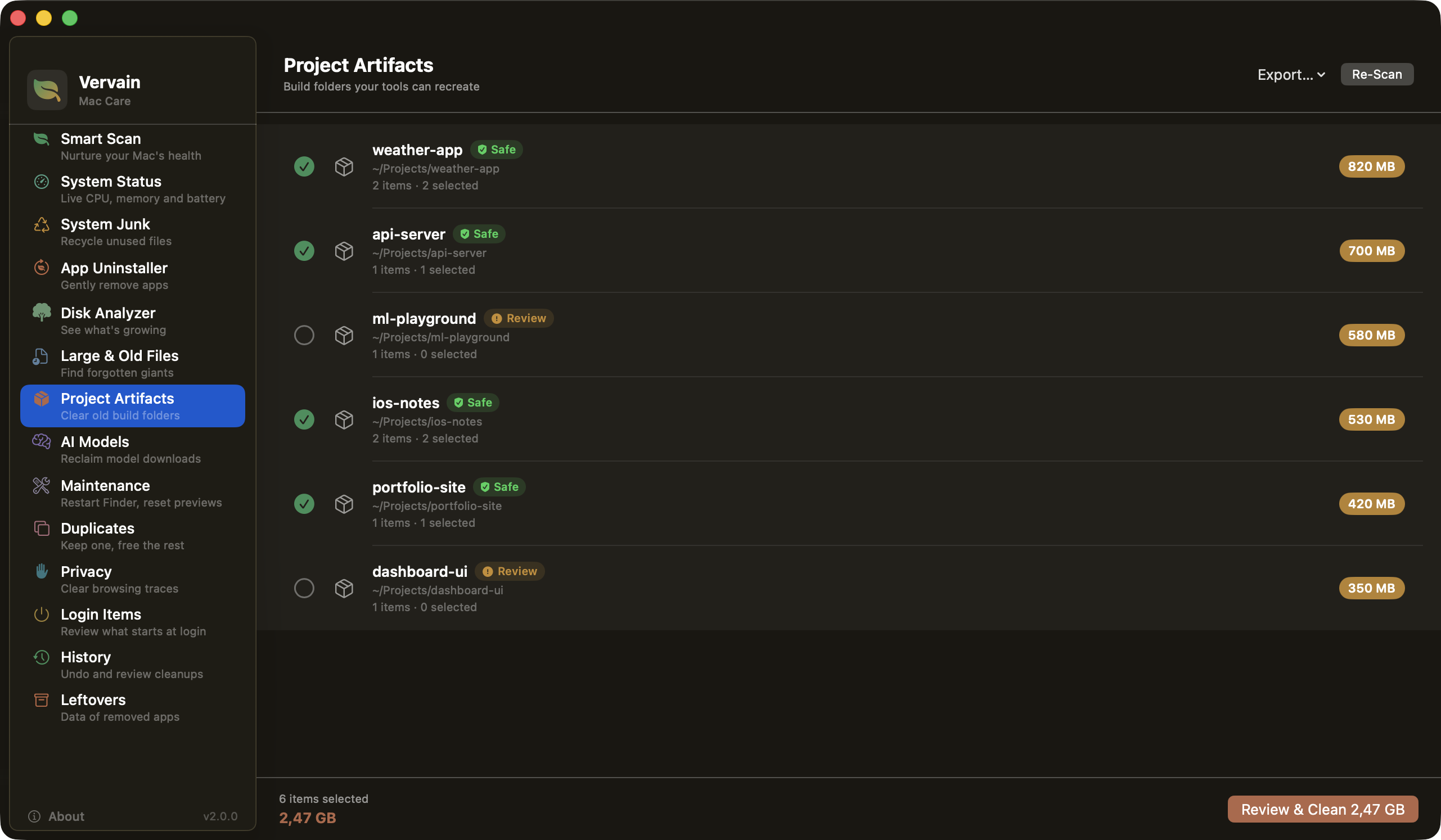
Project Artifacts

Build folders, grouped by project.

Old node_modules, target, .build and Pods folders pile up quickly. Vervain groups them by project and only pre-selects the ones git ignores, in projects you haven't touched for a week. Everything goes to the Trash.

Vervain Project Artifacts, build folders grouped by project with safe and review labels
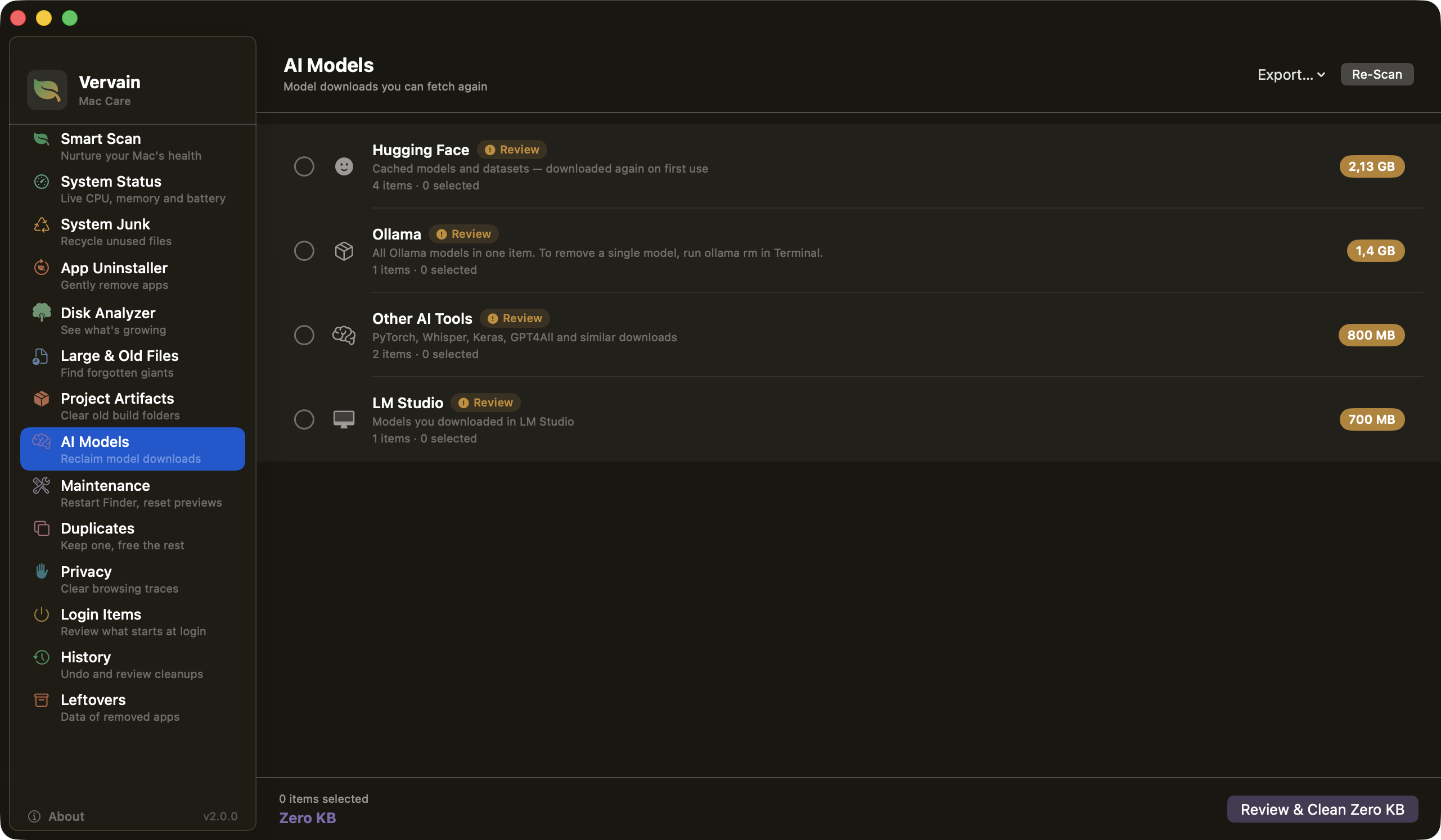
AI Models

Model downloads, listed one by one.

Hugging Face, LM Studio, Ollama and similar tools can hold tens of gigabytes without you noticing. Each model is listed on its own, and none are selected for you, because downloading one again can take a while.

Vervain AI Models, downloads from Hugging Face, Ollama and LM Studio with sizes
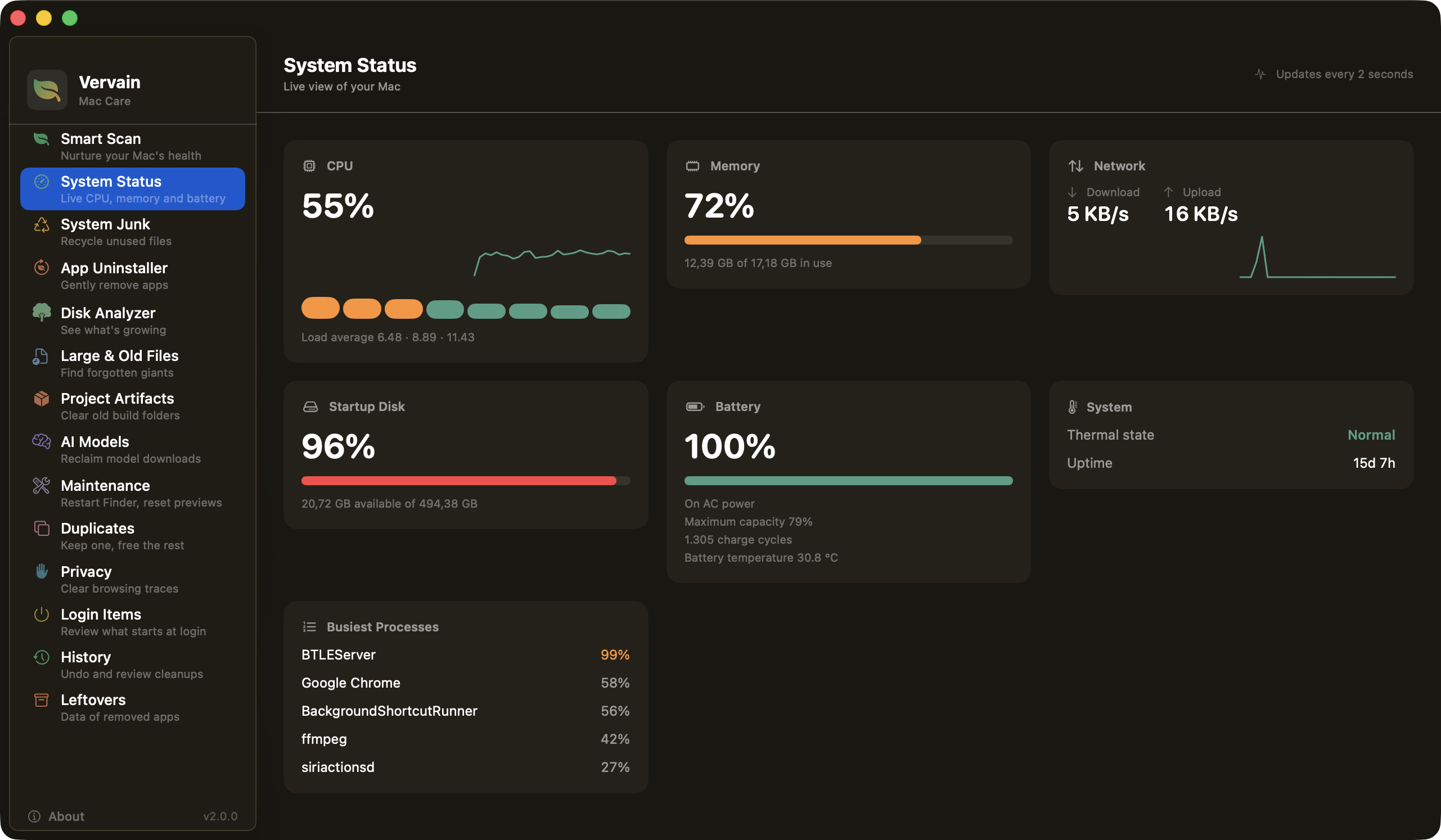
System Status

A live look at your Mac.

CPU, memory, disk, network and battery health, refreshed every two seconds while the window is open. When you leave the screen it stops, so it isn't another thing running in the background.

Vervain System Status, live CPU, memory, network and battery cards
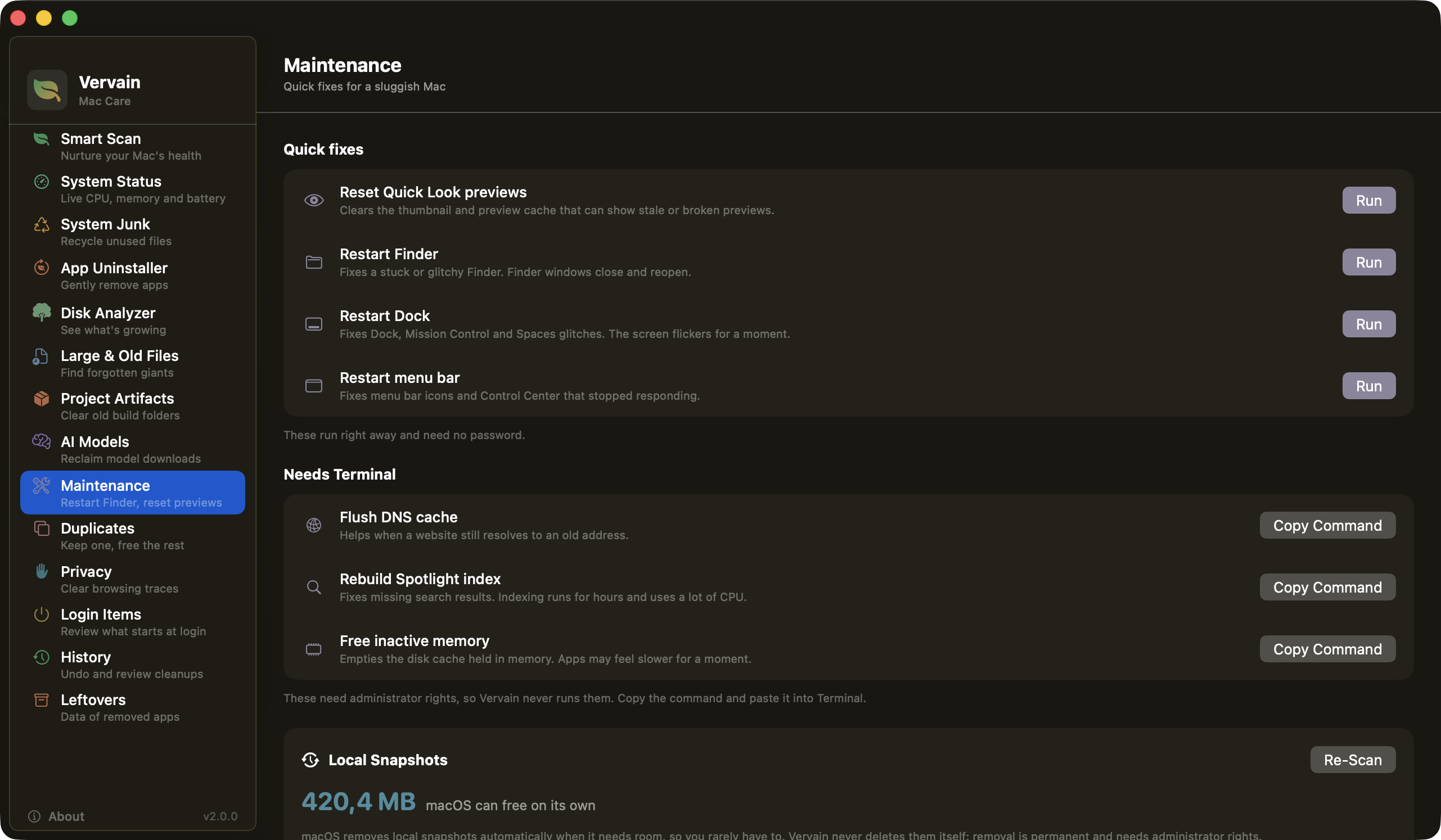
Maintenance

Quick fixes without your password.

Reset Quick Look previews, restart Finder, the Dock or the menu bar. For anything that needs an admin password, like flushing DNS, Vervain shows you the Terminal command and leaves running it up to you.

Vervain Maintenance, quick fixes and Terminal commands to copy

Built on trust, not tricks.

Private by design

Vervain never sends data anywhere. No telemetry, no analytics, no account required. Everything runs entirely on your Mac.

Trash only

Nothing is permanently deleted. Every cleanup moves files to your Trash. You can restore anything until you empty it yourself.

Review before you clean

Nothing is ever removed without a review screen. Risky or low-confidence items are flagged and never selected by default.

Built in the open.

Vervain is fully open source. Read every line of code, verify what it does, and contribute improvements. A cleaner that asks for Full Disk Access should let you check what it does, so you can.

View on GitHub

Speaks your language.

Vervain is available in 6 languages. It follows your Mac's system language automatically, or you can switch anytime in Settings (⌘,).

🇬🇧 English 🇫🇷 Français 🇩🇪 Deutsch 🇹🇷 Türkçe 🇪🇸 Español 🇨🇳 中文(简体)

Good to know.

What is Vervain?

Vervain is a free, open-source cleaner for macOS. It finds caches, logs, old installers, leftovers of removed apps, duplicate and large old files, old project build folders (node_modules, target, Pods) and AI model downloads. It shows you everything first and moves only what you pick to the Trash.

Is Vervain safe? Does it delete files permanently?

Nothing is permanently deleted. Every cleanup moves items to the macOS Trash, and a History screen can put them back. Every module goes through a review screen, and risky items are never pre-selected. The source code is public, so you can check how it works.

Does Vervain collect any data?

No. There are no analytics, no accounts and no tracking. The only network request Vervain can make is the update check, which asks GitHub for the latest release when you press a button, or once a day if you turn on the optional automatic check (off by default).

Which versions of macOS does Vervain support?

Vervain needs macOS 15 (Sequoia) or later.

How do I install Vervain?

Download the signed and notarized DMG from the GitHub releases page, or run: brew install yakupbulbul/vervain/vervain

Is Vervain free?

Yes. Vervain is free and open source under the MIT license. There is no paid tier and no account.

Does Vervain need Full Disk Access?

It is optional. With Full Disk Access Vervain can scan protected folders such as ~/Library. Without it, Vervain still works but scans fewer locations.

Start caring for your Mac.

Free to download. Open source. No account required.

Free Download

Get the latest DMG from GitHub. No App Store, no account needed.

Download latest

Homebrew

Install and update with a single command from your terminal.

brew install vervainclick to copy

Support

Vervain is made by a solo developer. A coffee helps keep it going.

Buy Me a Coffee